
Portrait Crops for LinkedIn, Websites, Press, and Speaking Profiles
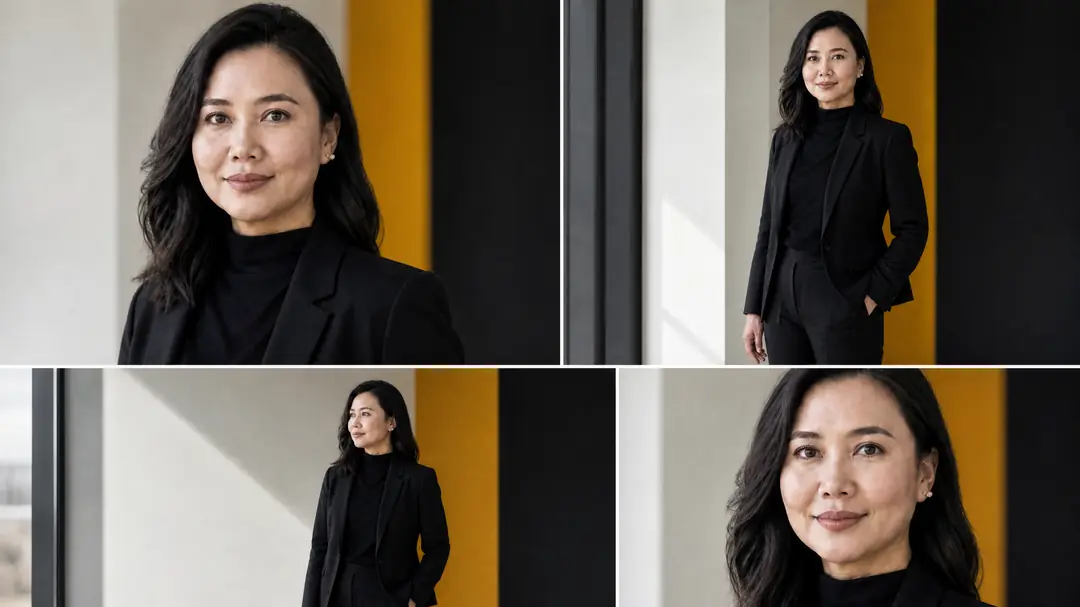
When you get professional photos taken, you do not just need one image. You need different shapes and sizes for different places. A picture that looks great on your company website might not fit the small circle on your LinkedIn profile. By planning your portrait crops ahead of time, you can get the most out of your photo session. This guide will help you understand the best ways to crop your portraits for LinkedIn, websites, press releases, and speaking profiles.
The Square Crop for LinkedIn and Social Media
Most social media platforms, like LinkedIn, use a square or circle for your profile picture. This means the photo needs to look good when the edges are cut off. For a great LinkedIn photo, the crop should focus closely on your face and shoulders.
Your face should take up most of the space. This helps people recognize you easily, even on a small phone screen. When taking the photo, it is smart to leave a little extra room around your head. This makes it easier to center your face in the circle without cutting off your chin or hair. A clean background works best for this tight crop.
The Wide Crop for Company Websites
Company websites often need wider photos. You might need a wide picture for an “About Us” page or a banner at the top of the screen. This shape is called a landscape crop. It is much wider than it is tall.
For a wide crop, you will need more background showing. The subject is usually placed to one side, leaving empty space on the other side. This empty space is very useful. Web designers can use it to add text, like your name or your job title. When planning your photo session in Singapore or Johor Bahru, think about where the photo will go on your website. This helps the photographer know how much background to include.
The Vertical Crop for Press and Magazines
If you are featured in a magazine or a news article, you will often need a tall, vertical photo. This shape is called a portrait crop. It looks like a standard printed photograph.
A vertical crop usually shows your head, shoulders, and sometimes your upper body. It gives a more complete look at your professional style. This crop is great for press releases or magazine covers. It is important to make sure your outfit looks neat and professional, as more of it will be seen. You can also include a bit of your office or workspace in the background to tell a story about what you do.
The Flexible Crop for Speaking Profiles
When you speak at an event or a conference, the organizers will ask for your photo. They might put it on a poster, a brochure, or a website. Because you do not know exactly how they will use it, you need a flexible photo.
The best choice is a medium crop that shows your head and chest, with plenty of space all around. Do not crop the image too tightly. If you give them a photo with extra space on the top, bottom, and sides, the organizers can cut it to fit their needs. They can make it a square, a tall rectangle, or a wide rectangle. Providing a flexible, high-quality image makes their job easier and ensures you look your best.
How to Plan for Multiple Crops
You do not need to take a different photo for every single crop. A skilled photographer can take one great photo and crop it in several ways. But this requires planning.
Before your photo session, make a list of all the places you will use the pictures. Tell your photographer what you need. They will know to take photos from a bit further away. This captures more of the background and your body. Later, during the editing process, they can cut the large photo into the smaller, specific shapes you need. It is always easier to cut a large photo down than to try and add missing parts to a small photo.
Practical Checklist for Your Portrait Session
To make sure you get all the crops you need, follow this simple checklist:
- Make a list of where you will use the photos (LinkedIn, website, news articles).
- Tell your photographer about this list before the session begins.
- Ask the photographer to shoot a little wider than normal.
- Make sure your outfit looks good from the chest up and the waist up.
- Request a mix of horizontal (wide) and vertical (tall) original shots.
- Ask for photos with the subject placed in the center and off to the side.
- Keep the background clean and simple so it does not distract from your face.
Delivery and Permissions
When you book a professional portrait session, it is important to discuss how the final images will be delivered. We will provide your chosen photos in high-resolution digital formats, suitable for both printing and web use. Please note that the delivery time depends on the scope of the project, the number of files, and our current editing capacity.
If your portraits are taken in a specific office building or private location, please ensure you have the right permissions to take photos there.
Get the Right Portraits for Every Platform
Having the correct portrait crops makes you look professional everywhere online and in print. Whether you need a tight square for LinkedIn or a wide shot for your company homepage, planning ahead makes all the difference. If you are ready to update your professional images with photos that work for every platform, please reach out to us through our contact page to discuss your needs.